Rotate PDF Online Free
Rotate PDF online free: turn one page or all of them, then save.
Rotate PDF online free and turn sideways or upside-down pages the right way up. Rotate a single page or the whole file, see exactly how it will look, then download it.
- Free, no sign-up
- Files never leave your device
- Up to 100 MB per file
Drop a PDF file here
or
Up to 100 MB per file. Your files stay on your device.
Your file stays on your device. Nothing is uploaded.
What next
- Scroll through the whole file once more: in a scan, one page is often turned differently from the rest.
- Working with a scan? Remove blank pages can take out the empty backs of single-sided sheets.
Step-by-step guide: How to Scan to PDF on iPhone, and Fix the Result
How to rotate PDF pages and save them
- 1
Click “Choose a PDF file” or drag your PDF into the box.
- 2
Click a page to turn it to the right, or use the small buttons under each page to turn it either way.
- 3
To fix every page at once, use “Turn all left” or “Turn all right”.
- 4
Press “Rotate pages”, then download your new PDF.
What happens to your file when you rotate it here
Every page in a PDF carries a small setting that says which way up to show it. When you press “Rotate pages”, that setting is the only thing we change. Text, pictures and fonts are written back exactly as they were. Each page is edited in place inside the file, so links, bookmarks and form fields keep working too.
Each click is a quarter turn, added to whatever direction the page already had. A page clicked four times is back where it started, so nothing is saved for it.
The thumbnails are drawn in your browser by PDFium, the same engine our text editor uses, and the new file is put together on your device as well. Nothing is uploaded. Files up to 100 MB open, and a protected file needs its password removed with Unlock PDF first.
Example: a double-sided scan with the backs upside down
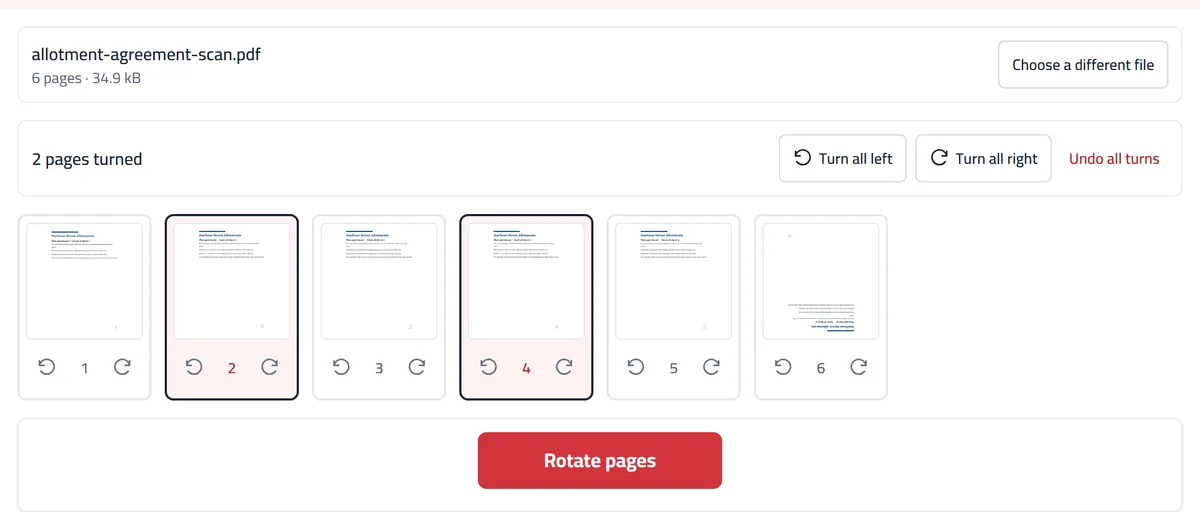
A scanner that feeds both sides of a sheet often flips the backs, so the fronts come out upright and every second page is upside down. Our invented example is a three-sheet allotment agreement, scanned on both sides into six pages. Pages 2, 4 and 6 came out upside down.
Two clicks on page 2 turn it half a turn, and the same goes for pages 4 and 6. In the screenshot, pages 2 and 4 are already upright and outlined as changed, page 6 is still upside down, and the counter reads “2 pages turned”. Once page 6 is done, “Rotate pages” saves a copy with all six pages upright and nothing else changed. Your original file stays as it was.
“Turn all right” would turn the good front pages too, so keep it for a file that came out wrong all the same way. If the backs are also out of order, put them in place with Merge odd and even pages first.
When you would use it
A report with one wide table in the middle, saved so that page lies on its side. Turn only that page and leave the rest alone, since every page keeps its own direction.
A PDF someone built from phone photos with an app that ignored which way the camera was held, so the landscape shots arrived sideways. Turn each one upright before you pass it on. Our own JPG to PDF reads the camera’s note and puts photos the right way up, so this mostly happens with files made elsewhere.
One upside-down page in a certificate or ID copy you are about to upload to an application form. Fix it in the file, so the person checking it doesn’t have to turn their screen.
What to expect
The turn is written into the file, so it holds when the document is opened, printed or emailed. A reader’s own rotate button usually turns only your view, which nobody else sees (why a turned page flips back).
Rotation works in quarter turns. A page scanned at a slight slant cannot be straightened here.
The whole page turns, never part of it. To set one picture at a different angle on a page, place it with Add an image, which can turn it freely.
The paper size does not change: a rotated A4 page is A4 on its side. Printers handle that, but glance at the print preview.
If the pages are in the wrong sequence rather than facing the wrong way, you want Rearrange pages. A page that shouldn’t be there at all, such as a blank back, goes with Delete pages or Remove blank pages.
Frequently asked questions
Is rotating pages really free?
Yes. No sign-up, no daily limit, and no watermark on your file.
Is my file uploaded?
No. The pages are shown and turned inside your browser, on your device. Your PDF is never sent to us or anyone else.
How do I rotate a PDF so it stays turned?
Choose the file, click each sideways page until it stands the right way up (or use “Turn all left” or “Turn all right”), then press “Rotate pages” and download. Many PDF readers can turn pages too, but often only on screen: Rotate View in Adobe Acrobat Reader, for example, is gone the next time you open the file. Here the new direction is written into the file you download.
Can I rotate one page in a PDF and not the others?
Yes. Click that page alone. Every page keeps its own direction, so you can turn one page left, another right, and leave the rest as they are.
Will the rotation stay when I open the file somewhere else?
Yes. The new direction is saved inside the file itself, so readers, printers and phones all show the page the way you left it.
Does rotating change the text or images?
No. Nothing is redrawn. Only the direction of the page changes, so text stays selectable and searchable, and links, bookmarks and form fields keep working.
My scan looks sideways. Will this fix it?
Yes. A scanned page is a picture inside the PDF, and turning the page turns the picture with it. The text in a scan still can’t be selected, because a scan has no text in it.
Does rotating a PDF make it bigger or lower the quality?
No. Only the page’s direction setting changes, and the text and pictures are written back untouched. Our six-page sample was 35,687 bytes before and 35,624 bytes after, and a scanned page keeps exactly the resolution it had.
How do I fix a PDF that opens upside down?
Press “Turn all right” twice for half a turn on every page, or click only the upside-down pages, twice each. The saved copy opens the right way up in any reader.
Can I flip a PDF, or change a landscape page to portrait?
A quarter turn makes a sideways page read upright, and the sheet keeps its shape, so a landscape page ends up standing on its short side. Mirror-image flipping is not something any of our tools does.
Will rotating break Arabic text or a right-to-left document?
No. The words themselves are never touched, so Arabic letters stay joined, lines still read from the right, and the page order stays as it was. Text you could select or search before rotating can still be selected and searched afterwards.
Why can’t I open my password-protected PDF?
Protected files are encrypted, so their pages can’t be read or changed. Remove the password first, then open the file again.
Related tools
More Organize PDF toolsGuides
- How to Scan to PDF on iPhone, and Fix the ResultScan paper documents to a PDF with the iPhone's own Notes or Files app, then fix what usually goes wrong: pages out of order, sideways pages and big files.
- How to Save a Rotated PDF Permanently on Any DeviceTurned a sideways page, saved, and it flipped back? Why most viewers only turn the view, and how to keep the new direction on Windows, Mac and phones.
- How to Fix a Messy Scanned PDF: Pages Out of Order, Sideways or BlankYour scan came out backwards, with sideways pages and empty backs? Fix it in three steps, in your browser, without scanning everything again.
- How to Combine Phone Photos of Documents into One PDF for an Online ApplicationCombine phone photos of your documents into one PDF for an online application: clear photos, the right order, the right way up. Free, no app needed.